Motorfest Speedometer 1.0


![Reshade Preset For NVE + Quantv [ColourFul]](https://img.gta5-mods.com/q75-w500-h333-cfill/images/reshade-preset-for-nve-quantv-colourful/5c161b-Comp-min.png "Reshade Preset For NVE + Quantv [ColourFul]")


181
4
181
4
Motorfest Speedometer
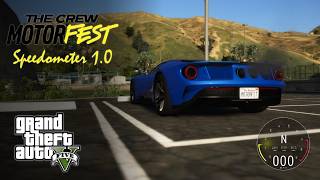
Bring the sleek, modern HUD from The Crew Motorfest directly into Grand Theft Auto V. This mod delivers a highly dynamic, fully customizable speedometer coupled with a custom built vehicle dynamics system for a completely refreshed driving experience.
Features
Next-Gen UI
A high-precision gauge featuring a smooth RPM needle sweep, digital speed display and gear indicator.
Total Customization
Fully adjustable on-screen layout with 6 switchable background themes.
Smart Driving Assists
Real-time, custom-tuned ABS, ESP and TCS handling interventions, complete with "Mild" and "Sporty" driving modes.
Current Limitations:
The Nitro system and its associated textures have been temporarily removed from this release to guarantee stability.
Driving Assists: Please note that the included assists are game level handling tweaks designed to mimic the behavior of traction, stability and braking aids. They are not realistic real-life physics simulations.
This mod has not yet been tested with GTA V Enhanced.
Installation
Please refer to the included ReadMe HTML file for complete, step-by-step installation and configuration instructions.
Required Dependencies
To use this mod, you will need to install:
(Refer to the included documentation for specific dependency links and versions.)
Thanks to JulioNIB, justalemon , Alexander Blade and Chiheb-Bacha.
Bring the sleek, modern HUD from The Crew Motorfest directly into Grand Theft Auto V. This mod delivers a highly dynamic, fully customizable speedometer coupled with a custom built vehicle dynamics system for a completely refreshed driving experience.
Features
Next-Gen UI
A high-precision gauge featuring a smooth RPM needle sweep, digital speed display and gear indicator.
Total Customization
Fully adjustable on-screen layout with 6 switchable background themes.
Smart Driving Assists
Real-time, custom-tuned ABS, ESP and TCS handling interventions, complete with "Mild" and "Sporty" driving modes.
Current Limitations:
The Nitro system and its associated textures have been temporarily removed from this release to guarantee stability.
Driving Assists: Please note that the included assists are game level handling tweaks designed to mimic the behavior of traction, stability and braking aids. They are not realistic real-life physics simulations.
This mod has not yet been tested with GTA V Enhanced.
Installation
Please refer to the included ReadMe HTML file for complete, step-by-step installation and configuration instructions.
Required Dependencies
To use this mod, you will need to install:
(Refer to the included documentation for specific dependency links and versions.)
- Script Hook V
- Script Hook V .NET
- LemonUI (place LemonUI.SHVDN3.dll in your scripts folder)
- OpenIV (to install the HUD textures)
Thanks to JulioNIB, justalemon , Alexander Blade and Chiheb-Bacha.
First Uploaded: okoli 20 ur
Last Updated: okoli 20 ur
Last Downloaded: 2 minuti
9 Comments
More mods by REX MODS:
Motorfest Speedometer
Bring the sleek, modern HUD from The Crew Motorfest directly into Grand Theft Auto V. This mod delivers a highly dynamic, fully customizable speedometer coupled with a custom built vehicle dynamics system for a completely refreshed driving experience.
Features
Next-Gen UI
A high-precision gauge featuring a smooth RPM needle sweep, digital speed display and gear indicator.
Total Customization
Fully adjustable on-screen layout with 6 switchable background themes.
Smart Driving Assists
Real-time, custom-tuned ABS, ESP and TCS handling interventions, complete with "Mild" and "Sporty" driving modes.
Current Limitations:
The Nitro system and its associated textures have been temporarily removed from this release to guarantee stability.
Driving Assists: Please note that the included assists are game level handling tweaks designed to mimic the behavior of traction, stability and braking aids. They are not realistic real-life physics simulations.
This mod has not yet been tested with GTA V Enhanced.
Installation
Please refer to the included ReadMe HTML file for complete, step-by-step installation and configuration instructions.
Required Dependencies
To use this mod, you will need to install:
(Refer to the included documentation for specific dependency links and versions.)
Thanks to JulioNIB, justalemon , Alexander Blade and Chiheb-Bacha.
Bring the sleek, modern HUD from The Crew Motorfest directly into Grand Theft Auto V. This mod delivers a highly dynamic, fully customizable speedometer coupled with a custom built vehicle dynamics system for a completely refreshed driving experience.
Features
Next-Gen UI
A high-precision gauge featuring a smooth RPM needle sweep, digital speed display and gear indicator.
Total Customization
Fully adjustable on-screen layout with 6 switchable background themes.
Smart Driving Assists
Real-time, custom-tuned ABS, ESP and TCS handling interventions, complete with "Mild" and "Sporty" driving modes.
Current Limitations:
The Nitro system and its associated textures have been temporarily removed from this release to guarantee stability.
Driving Assists: Please note that the included assists are game level handling tweaks designed to mimic the behavior of traction, stability and braking aids. They are not realistic real-life physics simulations.
This mod has not yet been tested with GTA V Enhanced.
Installation
Please refer to the included ReadMe HTML file for complete, step-by-step installation and configuration instructions.
Required Dependencies
To use this mod, you will need to install:
(Refer to the included documentation for specific dependency links and versions.)
- Script Hook V
- Script Hook V .NET
- LemonUI (place LemonUI.SHVDN3.dll in your scripts folder)
- OpenIV (to install the HUD textures)
Thanks to JulioNIB, justalemon , Alexander Blade and Chiheb-Bacha.
First Uploaded: okoli 20 ur
Last Updated: okoli 20 ur
Last Downloaded: 2 minuti
 5mods on Discord

This file has been approved automatically. If you think this file should not be here for any reason please report it.
Your mod is really nice. I was wondering if you could move the gauge to the right side, because it overlaps with the map.
@gtav-fan Yes, you can shift it to the right by opening the menu > Select Category > Global Settings and change Offset_X to 1050 (or in the .ini, set Offset_X=50 under [Motorfest]).
Thanks...
When I install MotorfestDigits.ytd and MotorfestGauge.ytd from the Enhanced version to the location `update\update.rpf\x64\data\cdimages\scaleform_generic.rpf\`, the game crashes and fails to launch
@gtav-fan The mod was built and tested only on the Legacy version of GTA V, so I can’t confirm it works on the Enhanced edition. The Enhanced version might be using different file handling and may require updated texture formats or a different installation path. It might be possible to make it compatible, but that needs proper testing and likely some adjustments to the .ytd files. For now, i’d recommend sticking with Legacy GTA V official Enhanced support isn’t available yet, but I’ll look into it for a future update.
This mod is excellent and works perfectly on GTA V Legacy. I followed the step-by-step instructions in the readme and it worked.
@Itachi-GAMERBOSS Thank You :)
Thanks, I'm waiting for the Enhanced update